There are exactly two legitimate routes for a coinglass app download: the Apple App Store and Google Play. That is the whole list. No first-party APK, no Windows client, no standalone macOS application — the only desktop presence is the iOS build running natively on an Apple silicon Mac.
The search results disagree. Type "coinglass apk" and four mirrors offer you a file; type "coinglass desktop download" and you get product pages for software nobody wrote. Both queries lead somewhere CoinGlass does not control. On a phone that also holds an exchange app and a wallet, that matters.
Below: listing detail verified against the live stores on 27 July 2026, a label on every figure that did not come from the platform owner, and what a repackaged build can do to you. If you came for the platform rather than the app, start with what crypto derivatives data measures.
The short answer
Install from the App Store on iOS or Google Play on Android, and nowhere else. CoinGlass's download page links to those two destinations and hosts no installer of its own. If a file did not come from one of those stores, CoinGlass did not put it in your hands.
The four routes people try
- Apple App Store
- Official. ID 1522250001, from Coinglass Technology Co., Limited. Covers iPhone, iPad, Apple silicon Macs, Vision Pro.
- Google Play
- Official. Package
com.coinglass.android, developer Coinglass.com. - APK mirrors
- Not official. Third-party redistribution, checkable against no published hash.
- Desktop installers
- Do not exist. Anything offering one is a browser wrapper or malware wearing the logo.
One correction, the most-copied error in guides on this subject: the App Store ID is 1522250001. The number 1610239971 circulates widely and returns a 404. Nobody who published it opened it.
What the two official listings actually say
The two listings differ in how far the numbers can be trusted. The iOS figures were read off Apple's live listing. The Android ones were not: a Play Store fetch returned truncated content and AppBrain blocked direct access, so the installs, rating, version and update date below are AppBrain's estimates, not Google's figures. We label them rather than launder them into precision.
| Field | iOS (App Store) | Android (Google Play) |
|---|---|---|
| Name | CoinGlass - Bitcoin & Crypto, subtitled "Price Alerts & Crypto Tracker" | CoinGlass - Bitcoin & Crypto |
| Publisher | Coinglass Technology Co., Limited | Coinglass.com |
| Identifier | App ID 1522250001 | com.coinglass.android |
| Category | Finance, rated 4+, Free no in-app purchases | Finance, Free |
| Size | 34.1 MB | Not published |
| Rating | 4.9 / 5 · 5,700 ratings | ≈4.78 / 5 · ≈55,000 AppBrain |
| Installs | Apple does not publish | 1,000,000+ AppBrain |
| Version | 2.7.6, dated 26 June | 1.1.6.7, 17 Jul 2026 AppBrain |
| Minimum OS | iOS 12.0+ | Android 5.0+ AppBrain |
| Also runs on | iPod touch; macOS 11.0+ on M1 or later; visionOS 1.0+ | Nothing else |
| Languages | 14, including Japanese, Korean, Russian, Turkish, Vietnamese and both Chinese scripts | — |
| On store since | July 2020 | — |
Where these numbers come from
iOS: Apple's live listing for app ID 1522250001, read 27 July 2026. Android: AppBrain's page for com.coinglass.android, after a direct fetch was blocked. Sources disagree on iOS — one aggregator still showed 2.6.8 and 4.88 from 5.4k ratings, dated 5 March 2026. Apple's page supersedes it.
Why the iOS and Android versions look nothing alike
The builds use independent versioning schemes, so the gap between 2.7.6 and 1.1.6.7 says nothing about whether either is current. A four-part string starting with 1 reads like a neglected build beside a mature 2.x release. It is not one.
Read the dates instead. AppBrain puts the last Android update at 17 July 2026; the iOS build carries a late-June date. Both sit inside a normal maintenance cadence. Version numbers are bookkeeping chosen by whoever runs that platform's release pipeline, and mobile teams routinely split those pipelines. What the strings cannot tell you is feature parity — for that, install and look.
The CoinGlass APK question
Every CoinGlass APK on the internet is unofficially redistributed, because CoinGlass publishes none. With no first-party file and no signing hash, no mirror can be checked against a reference. You are not choosing between an official APK and a mirrored one, but between Google Play and a stranger.
The mirrors rank well: APKMirror hosts a CoinGlass developer page, and Aptoide, apk.gold and Softonic carry builds. Some run real verification, and most files they host are unmodified. That is not the same as safe: you cannot tell from a download page which case yours is, and the failure mode is not a crash.
A repackaged APK does not have to attack CoinGlass to rob you
Decompiled, re-signed with the attacker's own key and republished, the app becomes whatever they want to ship. It can draw a transparent overlay over your exchange or wallet app, harvesting credentials typed into what looks like the real login screen. It can watch the clipboard and swap a pasted wallet address as you paste — the quietest theft there is, because the address you checked is not the one sent. And a sideloaded app gets no Play updates, so a compromised build sits there indefinitely, escalating permissions the real app never asks for.
If you are going to sideload anyway
Some readers have no Play access at all: a device without Google services, an undistributed region, a locked-down work phone. The mobile site works in any browser, serves the same data and carries none of this risk — the right answer for almost everyone there. If you will install a file anyway, this is harm reduction, not encouragement.
- Check the package name character by character. It must be
com.coinglass.android, not a lookalike with a transposed letter. - Verify the signing certificate. Compare the APK's fingerprint against a copy installed from Play. If they differ, someone re-signed it, and there is no benign explanation.
- Never grant accessibility permissions. A data app has no use for the accessibility service, and it is the permission that most reliably turns a malicious app into a credential harvester — it can read and control other apps' screens.
- Refuse anything asking for a seed phrase. CoinGlass supports no trading, deposits or withdrawals, so it has no mechanism that could use one. That prompt is not a bug, it is the attack.
- Never sideload onto the phone holding your funds.
The pattern is broader than APKs. CoinGlass has warned that searching its own name can surface a phishing site, and the lookalike domain coinglass.online is flagged as a possible scam. The instincts that keep you off a fake download page keep you off a fake sign-in page — the subject of our guide to spotting a fraudulent CoinGlass login.
The desktop app that does not exist
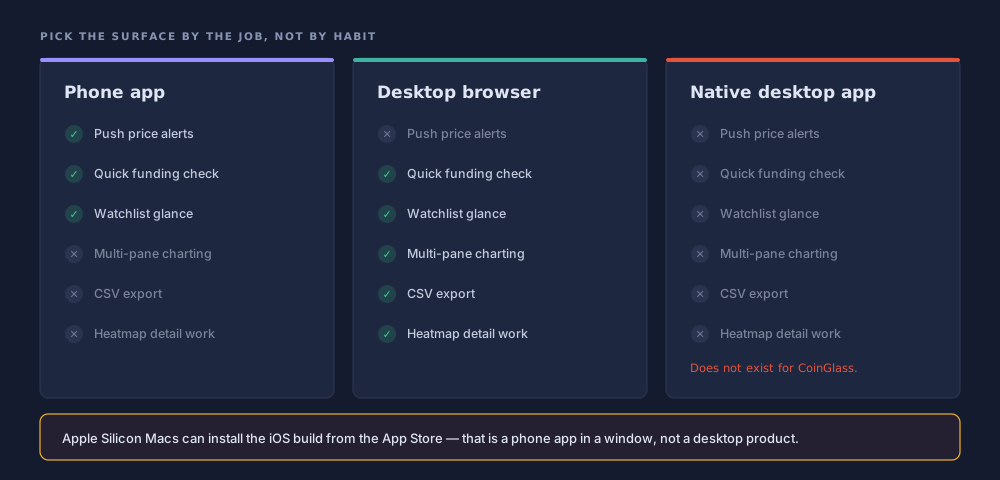
There is no CoinGlass application for Windows and no standalone one for macOS. The platform is browser-only, and its download page confirms it by offering only two mobile store links. Results for "coinglass desktop download" fall into three buckets.
- Harmless: pages titled "CoinGlass for PC" that, read closely, tell you to open coinglass.com in Chrome.
- Pointless: emulators, or shells loading the site in a stripped browser window.
- Dangerous: a signed-looking
.exeor.dmgfor software never built. Desktop malware has the larger blast radius.
The Apple silicon exception, stated precisely
One narrow case is real. The App Store listing declares compatibility with macOS 11.0 or later on an M1 chip or newer, so the iOS build runs natively on Apple silicon; the same listing covers visionOS 1.0. But that is the phone app on a bigger screen — no native window management, no multi-monitor charting. Intel Macs cannot install it at all. On a Mac, the browser is the better product.
Reading the data is step one. Seeing it move is step two.
Charts of open interest and funding make far more sense next to a live book you can actually watch.
Sponsored link. We may earn a commission if you open an account through it, at no extra cost to you. This is not investment advice, and leveraged products can lose you more than you deposit. See our disclaimer.
What the app is good at, and what needs a browser
The app monitors; the browser analyses. Treat them as two products sharing one data set.
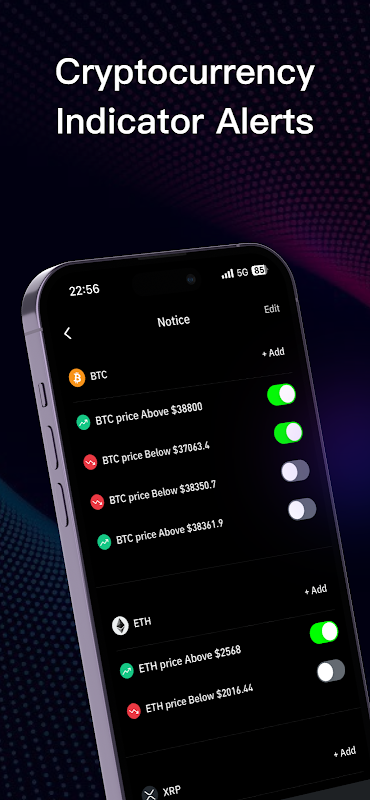
Alerts are the real reason to install. The engine triggers on price, volume, volatility, open interest, wallet activity, Ethereum gas fees, Bitcoin mempool size and whale movements, and delivers by email, app push, browser notification, webhook, a Telegram bot or a Discord bot. Price alerts cover more than 7,000 cryptocurrencies. That breadth on both axes is unusual, and it is what belongs on a device you carry.
What the app does well
- Alerts on price, volume, volatility, open interest, wallet activity, gas, mempool and whale movements.
- Webhook, Telegram and Discord routing, so an alert can drive a bot.
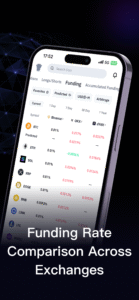
- Watchlists, and quick lookups: funding, aggregate open interest, the 24-hour liquidation total.
Where you need the browser
- Multi-pane charting: Supercharts and Legend assume a screen you cannot hold.
- Heatmap work: switching Model 1, 2 and 3, moving the liquidity threshold, comparing ranges from 12 hours to two years.
- CSV and bulk export, buying Prime or an API plan, and retrieving an API key.
The heatmap is the clearest case. On a phone you can see that a bright band exists; you cannot compare it across three models, move the threshold and check whether it survives — the work that separates reading the surface from being misled by it. See the guide to how the liquidation heatmap is actually built.
Permissions and privacy on a read-only data app
Notification permission is the only one that earns its keep. That is easy to reason about, given what CoinGlass structurally is: an aggregator of public market data supporting no trading, deposits or withdrawals. It has no execution path, so it needs no wallet connection, no seed phrase and no exchange API key with withdrawal rights. Decline location, contacts and anything touching accessibility; a build that asks is not the store version.
The withdrawal-permission distinction, since it applies everywhere
If you ever connect exchange API keys to an analytics tool — not this one, which does not ask, but the category generally — scope is the security question.
| Scope | What it can do | Cost if it leaks | Give it to a dashboard? |
|---|---|---|---|
| Read | See balances, positions, trade history | Disclosure of your position data | Yes, if required |
| Trade | Open and close positions | Your book, traded by someone else | Only for a bot |
| Withdraw | Move funds off the exchange | The funds | Never |
Never enable withdrawal on a key you hand to an analytics tool
No dashboard needs it. A tool asking for withdrawal rights to display your data is either badly engineered or not what it claims to be, and from outside those look identical. Enable read only, bind the key to an IP allowlist where you can, and rotate it if the tool changes hands.
Installing it without getting the wrong app
The install takes under ten minutes. The only part needing attention is confirming the listing before you tap: clones copy icons, screenshots and names, but not a five-year history.
Start from the official download page
Open coinglass.com/download and follow the store links there. Store search is where clones live; a vendor link cannot reach one.
Read the publisher string before anything else
On iOS the seller must read Coinglass Technology Co., Limited and the URL must carry app ID 1522250001. On Android the developer must read Coinglass.com and the package
com.coinglass.androidexactly. A near-match is not a match.Sanity-check the history, not the artwork
The iOS listing has been live since July 2020 with 5,700 ratings at 4.9; Android shows over a million installs and ~55,000 ratings per AppBrain. A familiar icon over a few reviews and a recent publish date is the clone signature.
Install, then decline every optional permission except notifications
A 34.1 MB download needing iOS 12.0 or Android 5.0. Allow notifications and nothing else — no market-data feature needs your contacts, location or accessibility access.
Set alerts up before you explore anything else
Configure the alerts that made you want the app — a price level, a funding-rate threshold, an open-interest move — then pick delivery channels: push for urgency, Telegram or a webhook when it must reach a bot. Do this first; it is what the app is best at.
Confirm it never asks for wallet access
Nothing in the real app requests a wallet, a seed phrase or a withdrawal-enabled key. If a screen does, uninstall it and check where the file came from. Signing in is optional for browsing, required for saved alerts.
Updates, storage and battery reality
An app that polls and pushes will use background refresh, and no setting makes that untrue. Alerts are only useful if the app wakes up, and waking up costs battery. Both platforms let you throttle it — Background App Refresh on iOS, battery optimisation on Android — at the price of alerts arriving late. Storage is a non-issue: 34.1 MB installed, growing through cached chart data that clears with one reload.
Keep automatic updates on: store-delivered updates are what displaces a bad build, and precisely what a sideloaded APK lacks. Both listings show the app as free, with no in-app purchases. The paid products live on the website — Prime at $28 monthly, $78 quarterly or $268 annually, and API plans from $29 a month with no free tier.
Verdict: who should install it
The bottom line
Install it if you want alerts on your phone. Skip it if you want to analyse anything. That is not a criticism — the app is well rated, small, free of in-app purchase pressure and maintained as of July 2026. Its platform's depth simply lives in the browser.
Two official routes exist and both are safe: App Store ID 1522250001 from Coinglass Technology Co., Limited, and Google Play package com.coinglass.android from Coinglass.com. Every APK mirror is a third party's redistribution with nothing to check it against, and there is no desktop build beyond the iOS app on Apple silicon. CoinGlass is read-only infrastructure: anything carrying its name that wants a wallet, a seed phrase or withdrawal rights is something else wearing the name.
Frequently asked questions
Is there an official CoinGlass APK download?
No. CoinGlass's own download page links only to the Apple App Store and Google Play. It hosts no APK file of its own, and it publishes no signing hash you could check one against. APK mirrors such as APKMirror, Aptoide, apk.gold and Softonic do carry files named for the app, but every one of them is redistributed by a third party rather than served by CoinGlass. If Google Play is unavailable to you, the mobile web site is the safer fallback.
What is the correct CoinGlass App Store ID?
The App Store ID is 1522250001. CoinGlass's own download page points at apps.apple.com/us/app/id1522250001, and that identifier resolves to the listing published by Coinglass Technology Co., Limited. The ID 1610239971 circulates in several third-party guides and returns a 404. If a link you were sent uses that second number, the person who wrote it never checked it, which tells you how much else on that page was verified.
Is there a CoinGlass desktop app for Windows or macOS?
There is no Windows application and no standalone macOS application. The full platform is browser-only. The single exception is Apple silicon: the iOS build is listed as compatible with macOS 11.0 or later on an M1 chip or newer, so Mac users can install the phone app from the Mac App Store. Anything else presented as a "CoinGlass desktop client" is a browser wrapper at best.
Is the CoinGlass app free?
Both listings show the app as free, and the App Store listing shows no in-app purchases as of 27 July 2026. That does not make the whole platform free. CoinGlass Prime is sold on the website at $28 monthly, $78 quarterly or $268 annually, and API access starts at $29 a month with no free tier. Those are bought in a browser, not through an app store billing flow.
How do I know I am installing the real app and not a clone?
Check the developer string, not the icon. On iOS the seller must read Coinglass Technology Co., Limited; on Google Play the developer must read Coinglass.com and the package must be com.coinglass.android exactly. Clones copy the icon, the screenshots and often the name, but they cannot copy a developer account with a July 2020 launch date and tens of thousands of accumulated ratings.
What alerts can the CoinGlass app send?
The alert engine triggers on price, volume, volatility, open interest, wallet activity, Ethereum gas fees, Bitcoin mempool size and whale movements. Delivery runs through email, app push, browser notification, webhook, a Telegram bot and a Discord bot. Price alerts cover more than 7,000 cryptocurrencies. Alerts are the strongest argument for having the app at all — everything else it does, a browser does better on a bigger screen.
Does the CoinGlass app need my wallet or exchange keys?
No. CoinGlass aggregates public market data and does not support trading, deposits or withdrawals, so it has no reason to touch a wallet. The company has publicly stated that its official site and app will not ask users to link wallets. Any app or page carrying CoinGlass branding that requests a wallet connection, a seed phrase or an API key with withdrawal rights is fraudulent by definition.
Why is the Android version 1.1.6.7 when iOS is on 2.7.6?
Because the two builds are versioned independently, not because one is abandoned. The Android package was last updated on 17 July 2026 per AppBrain, and the iOS build carries a late-June release date, so both are in active maintenance. Version strings are internal bookkeeping decided by whoever cuts the release; comparing them across platforms tells you nothing about feature parity or freshness.
Keep reading