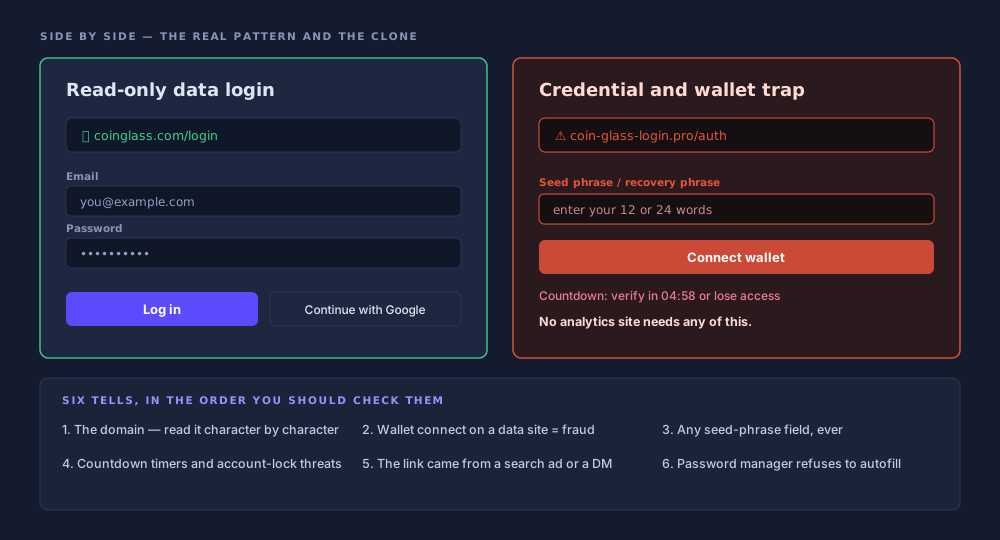
The real coinglass login page is at coinglass.com/login. Opened in a live browser on 27 July 2026, it holds an email field, a password field, a "Forgot Password? Reset Password" link, a divider reading OR, and one button marked "Continue with Google". Underneath, a line offers to create an account. Registration is free, at coinglass.com/signup. That is the whole form.
What is absent matters more. There is no wallet connection on that page. No seed-phrase box, no WalletConnect modal, no "verify your holdings" step, no deposit prompt. CoinGlass sells access to derivatives market data. It has never needed the keys to your money, and its sign-in page has never asked for them.
Which produces an odd asymmetry. A CoinGlass account is among the least dangerous logins you own, because there is nothing inside it to steal. The dangerous part is the thirty seconds before you reach it: the search results, where anyone with a credit card outranks the organic listings and anyone with a registrar owns a name one character off.
Where the real CoinGlass login page lives
Every legitimate CoinGlass login starts on one host: coinglass.com. Everything else we observed sits on a subdomain of it. Type it once, bookmark the result, use the bookmark from then on. That habit alone defeats the whole category of attack described below, because a bookmark cannot be outbid.
| Domain | What it is | Status |
|---|---|---|
coinglass.com | Platform, login, signup, pricing, dashboards | Legitimate |
docs.coinglass.com | API reference and developer docs | Legitimate |
legend.coinglass.com | Legend, the advanced charting environment | Legitimate |
coinglass.online | Lookalike, flagged by ScamAdviser | Possible scam |
| Anything else | Unverified by us | Treat as hostile |
The mobile apps are a second front door with the same rule: install only from the App Store or Google Play, both linked from CoinGlass's own download page. Store listings, version strings and the sideloading problem are covered in the guide to downloading the CoinGlass app. An APK from a mirror is a login page you cannot inspect.
What an account actually unlocks
Less than most people assume. CoinGlass runs a freemium model in which the bulk of the data is public: open interest, funding rates, liquidation totals, long/short ratios and ETF flows all render without a sign-in. The liquidation heatmap is viewable without an account too, limited on the free tier to BTC and ETH, 6-month and 12-month views, no auto-refresh.
| Function | Account needed | Basis |
|---|---|---|
| Retrieve an API key from the dashboard | Yes | Stated in CoinGlass API documentation |
| Save a Supercharts configuration | Yes | Documented; registration required to persist layouts |
| Manage a Prime or API subscription | Yes | Billing is attached to an account |
| Alerts and watchlists | Almost certainly | Our inference — not confirmed on a published page |
| Read open interest, funding, liquidations | No | Free web access, no registration |
On alerts and watchlists we are inferring, and we would rather say so. Alerts deliver to email, app push, webhook, Telegram and Discord; a watchlist is a saved set of instruments. Both need per-user state and a destination, which in practice means an account. No published page states it, so treat it as reasoning.
2FA: the honest answer
We do not know whether CoinGlass offers two-factor authentication. Nothing on the pre-authentication login form indicates it: no authenticator-app option, no security-key prompt, no mention of a second step. If 2FA exists it would sit in account settings behind the login, and we found no published CoinGlass page documenting it. Any guide confidently explaining how to enable CoinGlass 2FA is describing something it has not verified.
What we checked, and what we could not
The login form was opened and read in a live browser on 27 July 2026; the two fields, the reset link and the Google button come from that. Account settings sit behind authentication and were not inspected. Absence of evidence here is exactly that.
The practical answer does not depend on resolving it. Give the account a long random password from a manager and never reuse it. That costs nothing and removes the only realistic attack on a funds-free account. Then spend the effort where it converts into safety: 2FA on email, on Google, and above all on the exchange. That last one holds money, and it is what attackers are working toward.
Three account types, three risks
Most confusion about crypto account security comes from treating three different things as one category. An analytics login, an exchange login and a self-custody wallet fail in unrelated ways, and the right amount of paranoia for each differs by orders of magnitude.
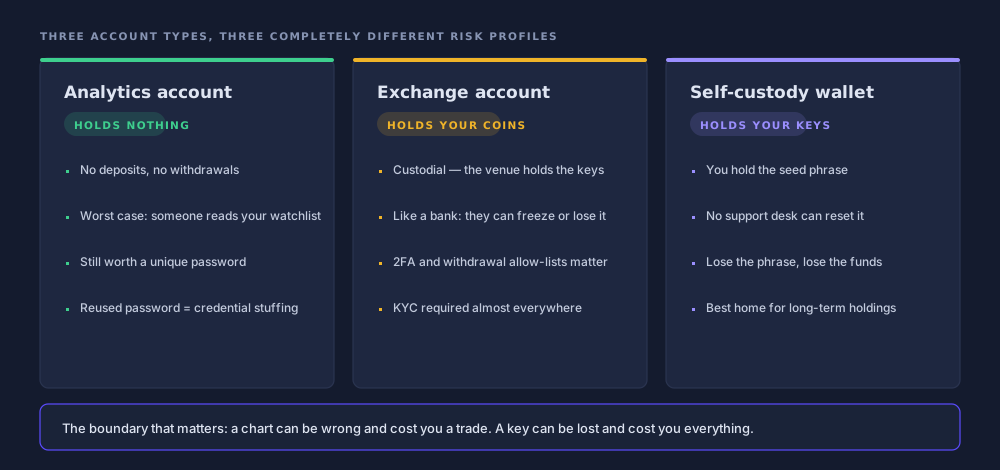
Holds nothing
A CoinGlass account stores preferences, saved charts, alert destinations and possibly an API key. Worst realistic case: somebody reads your watchlist and burns your paid quota. Still worth a unique password, because leaked pairs get replayed elsewhere.
Your money, in their name
A custodial venue holds the private keys and owes you a balance, like a bank. It can freeze, restore and be compelled. So 2FA, withdrawal allow-lists and API permission scopes are the real defence, and identity verification is part of the deal.
Your money, in your hands
You hold the seed phrase, so you are the security department. No password reset, no support desk, no reversal. Compromise is permanent. In return, nobody can freeze it or lend it out.
The distinction underneath is custodial versus non-custodial. Custodial means someone else holds the keys and keeps a ledger entry of what you are owed; you log in to instruct them. Non-custodial means the keys derive from a phrase only you possess, and there is no login because there is no operator. The phrase is the account.
Custodial
A password can be reset
Lose it and support can verify you and restore access. The flip side: the venue's own failure, insolvency or compliance action becomes yours. You are an unsecured creditor with a dashboard.
Non-custodial
A phrase cannot be reset
Nothing to recover, only twelve or twenty-four words that regenerate every key. Nobody can help you, which is the same property that means nobody can freeze you.
Password reuse is the bridge between the columns
An analytics account holds no money, so it gets a weak password, so that password gets reused, so the pair leaks in an unrelated breach and is replayed against the exchange. That replay is credential stuffing, and it is how a harmless login becomes an expensive one.
Why the search itself is the risk
CoinGlass has publicly warned that a Google search for its own name can surface a phishing site. In an advisory reported on 3 January 2024 it told users its official website and app will not ask them to link wallets, and restated that the platform supports no trading, deposits or withdrawals. The company was telling people not to trust the search engine.
Where these claims come from
The advisory was reported by ChainCatcher on 3 January 2024 and carried the same day on Binance Square. coinglass.online is flagged as a possible scam by ScamAdviser. The login-form description is our own live observation, not a CoinGlass page.
The diagram at the top of this page sets the two forms side by side. The real page asks for two things you already know. The fake asks for those two, then keeps going: a wallet-connect button, a recovery-phrase field dressed as "restore your account", a support-chat bubble, usually a timer. Every extra field is a question about the page.
The official site and app will not allow users to link their wallets, and the platform does not support trading, deposits or withdrawals.
CoinGlass phishing advisory, as reported 3 January 2024
The one rule that catches every fake
Remember the shape of the service. CoinGlass reads markets. It does not move money, hold money or touch a chain on your behalf. That structural fact produces a test with no exceptions and no edge cases.
A read-only data site never needs your keys
No page carrying the CoinGlass name has any legitimate reason to request a wallet connection, a seed phrase, a deposit or a withdrawal. If one does, it is fraudulent. Not misconfigured, not a new feature, not a partner integration. Fraudulent, no exceptions. Close the tab.
The rule generalises to every analytics dashboard, block explorer, portfolio tracker and "airdrop checker" you will meet. Tools that read data do not need write access to your funds. The moment one asks for it, the category has been violated — and the category is easier to remember than any list of domains.
Reading the data is step one. Seeing it move is step two.
Charts of open interest and funding make far more sense next to a live book you can actually watch.
Sponsored link. We may earn a commission if you open an account through it, at no extra cost to you. This is not investment advice, and leveraged products can lose you more than you deposit. See our disclaimer.
The tells, in checking order
Run these in sequence against any page presenting itself as a CoinGlass login. The cheapest checks eliminate the most fakes, so the order matters as much as the list.
Read it character by character
Not the page, not the logo. The address bar, left to right, slowly. Watch for extra words, swapped letters and different endings such as the flagged coinglass.online. The word sitting immediately left of the ending is the real owner.
The top result is for sale
Paid placements render above organic results and go to whoever bids. Ranking first proves budget, not legitimacy. Scroll past the ad block, or skip the search entirely.
Your password manager is smarter than you
A manager fills credentials only on the exact domain it saved them against. A silent refusal is a domain-mismatch alarm, not a bug. Do not paste the password manually to work around it. The most reliable signal here.
Manufactured pressure
Countdown clocks, "your account locks in 15 minutes", forced re-verification, a support agent appearing unprompted. All of it exists to stop you reading the address bar.
One purpose only
A recovery-phrase field has exactly one function, and it is not recovery. No exchange, data platform or support desk needs those words. Typing them hands over the funds.
Encryption is not endorsement
Certificates are free and automated. A phishing page shows the same padlock. It certifies the connection, not the honesty of whoever is on the other end.
If you already typed it in
Work through this in order, highest impact first. The clock matters most in the final step and barely at all in the first.
Change the password on the real site
Reach
coinglass.comfrom your own bookmark or by typing the address. Never from an email link, a search ad, or the page you just left. Set a long random password from a manager.Change it everywhere you reused it
The step people skip, and the one that matters. The fake page was a collection point; reuse is what turns the collection into losses. Every service sharing that password needs a new one, starting with email.
Revoke the API keys
Sign in to the real account and revoke or rotate any key issued from the dashboard. On a paid plan that key is up to $699 a month of access someone else can consume.
Audit every exchange account
Look for withdrawal addresses you did not add, allow-list entries you do not recognise, API keys you did not create, sessions or devices you cannot place. Remove them, then change that password too.
Turn on 2FA wherever it is offered
Authenticator app or hardware key ahead of SMS. Exchange first, then email, then Google if you sign in through it. Where a service offers no 2FA, the unique password is doing all the work alone.
If you entered a seed phrase, move the funds now
A password can be changed; a seed phrase cannot. Generate a new wallet on a device you trust and move everything out immediately. Assume a sweeper bot is watching, and treat every address from that phrase as permanently compromised.
API keys and what they are worth
The one genuinely valuable thing a CoinGlass account can hold is an API key, and its value is measured in subscription dollars, not coins. There is no free API tier: access runs from $29 a month on Hobbyist to $699 on Professional, with Standard at $299. A leaked key is somebody consuming what you pay for, and rate-limiting you out of your own workflow.
Two kinds of API key, two kinds of problem
- Market-data key
- Read-only by construction. A leak is a billing and rate-limit incident: annoying, finite.
- Exchange key
- Scoped at creation to read, trade or withdraw. A trade-enabled key can drain an account through deliberately bad fills without touching withdrawal rights at all.
- The permission to watch
- Withdrawal. Never enable it without a specific reason, and pair it with an address allow-list when you do.
- IP restriction
- Where offered, bind the key to a fixed address. A stolen key that works from one IP only is close to worthless.
Treat the two as unrelated species. Rotating a data key is housekeeping. An exchange key with withdrawal permission and no allow-list is a bearer instrument for your balance. The wider picture of what derivatives data platforms do and do not touch is the frame: tools that read the market and venues that hold the money are separate systems, and confusing their security models is how people lose funds to a dashboard.
Verdict: create one or not
Create one only if you want something it unlocks. If you are reading heatmaps, checking funding rates or watching open interest, the free pages already serve you and an account is a credential to manage for no return. If you want saved layouts, alerts or an API key, register: signup is free and the risk profile is close to negligible.
The account is nearly harmless and mildly useful. Nothing about it justifies anxiety, and nothing about it justifies a reused password either. The real hazard here is not the login page. It is the route people take to reach it, and what waits on that route with an extra field or two.
The four things worth doing
Bookmark coinglass.com and stop searching for it. Give the account a unique password from a manager. Enable 2FA on the exchange and on email, where it demonstrably exists. And hold the one rule: a read-only data site never needs a wallet, a phrase, a deposit or a withdrawal.
Frequently asked questions
What is the official CoinGlass login URL?
The login form sits at coinglass.com/login, and registration at coinglass.com/signup. Checked in a live browser on 27 July 2026, the form contains an email field, a password field, a password-reset link and a "Continue with Google" button. The other domains we observed in use are docs.coinglass.com for API documentation and legend.coinglass.com for the Legend charting product. Anything else carrying the name should be treated as unverified.
Does CoinGlass support two-factor authentication?
We could not confirm it. Nothing on the pre-authentication login form indicates 2FA, and no published CoinGlass page we found documents it in account settings. If it exists, it would live behind the login. We are not going to claim it does. What we can say is that a long unique password from a password manager carries most of the weight here, because the account holds no funds to steal.
Do I need an account to use CoinGlass at all?
No. Most of the market data — open interest, funding rates, liquidation totals, long/short ratios, ETF flows — is viewable free on the web with no registration. An account is required to retrieve an API key from the dashboard, to save Supercharts configurations and to manage a subscription. Alerts and watchlists almost certainly need one too, though CoinGlass does not state that on a published page.
Is there a CoinGlass wallet connection?
No. CoinGlass is a read-only data platform: it does not support trading, deposits or withdrawals, and it has publicly stated that its official site and app will not ask users to link wallets. Any page bearing the CoinGlass name that offers a wallet connection, a WalletConnect prompt or a seed-phrase field is fraudulent. There is no legitimate version of that flow.
How do I know if a CoinGlass login page is fake?
Read the domain one character at a time before you read anything else on the page. The legitimate host is coinglass.com; the lookalike coinglass.online has been flagged as a possible scam by ScamAdviser. Then check whether your password manager offers to autofill. If it refuses, the domain does not match the one it saved, and it is right and you are wrong.
I entered my password on a fake CoinGlass page. What now?
Change the password on the real site, reached from your own bookmark rather than any link. Then change it everywhere you reused it, since reuse is what turns one leak into many break-ins. Revoke any API keys in your dashboard. Check your exchange accounts for withdrawal addresses or API keys you did not create. If you entered a seed phrase, move the funds immediately.
Can someone steal crypto through a CoinGlass account?
Not directly, because the account custodies nothing. The realistic damage is threefold: a leaked paid API key is somebody else consuming access you pay $29 to $699 a month for; a reused password gives an attacker a tested credential pair to replay against your exchange; and a phishing page that captured the password may also have captured whatever else you typed on it.
Is Google sign-in safer than an email and password on CoinGlass?
It removes one password from circulation, which matters if your habit is to reuse them, and it inherits whatever 2FA you already have on the Google account. The trade-off is concentration: the Google account becomes the single point of failure for everything signed in through it. Either route is defensible. Neither is a substitute for locking down the exchange account that actually holds money.
Keep reading